Choose mesh for 2-4 participants seeking zero server costs, SFU for 5-100+ participants needing flexible layouts, and MCU for scenarios requiring single composite streams or legacy system integration. Each topology serves distinct use cases with specific resource trade-offs.
A single architecture decision determines whether your WebRTC application scales to millions of users or crashes at 50 concurrent participants. The difference between choosing mesh, SFU, or MCU topology could easily mean the difference between a $500/month server bill and a $50,000/month infrastructure cost.
Why WebRTC Topology selection impacts your business success
WebRTC powers over billions of video minutes daily across applications from Zoom to WhatsApp. Yet many developers choose network topologies based on initial simplicity rather than scaling requirements, leading to expensive infrastructure overhauls within 12 months of launch.
The Hidden Costs of Wrong Topology Choices:
- Server Infrastructure: MCU deployments cost 10-50x more than SFU for equivalent participant loads
- User Experience: Mesh networks degrade video quality by 40% beyond 4 participants
- Mobile Performance: Poor topology selection drains mobile battery life 3x faster
- Development Time: Topology migrations require 3-6 months of engineering resources
Real-World Success with Proper Architecture: A livestreaming platform using Ant Media Server’s dynamic topology selection reduced client-side CPU usage by 75% while supporting 20x more concurrent participants. Another enterprise saved $200,000 annually by implementing Ant Media’s hybrid SFU-MCU approach instead of defaulting to MCU for all conferences.Modern ultra-low latency streaming demands (sub-500ms) combined with mobile-first user bases create topology selection complexity that requires expert guidance. This comprehensive guide provides the technical framework and business analysis to select optimal WebRTC topologies, with specific implementation guidance for Ant Media Server’s advanced topology support including stream-based SFU, track-based SFU, and GPU-accelerated MCU capabilities.
Table of Contents
What are WebRTC Network Topologies?
WebRTC network topologies define how media streams flow between participants in real-time communication sessions. The architecture choice determines bandwidth requirements, server processing load, scalability limits, and ultimately, your application’s success at scale. Understanding these architectures is essential before diving into WebRTC SDK integration.
Mesh Network Topology: Direct Peer-to-Peer Architecture
How Mesh Networks Function
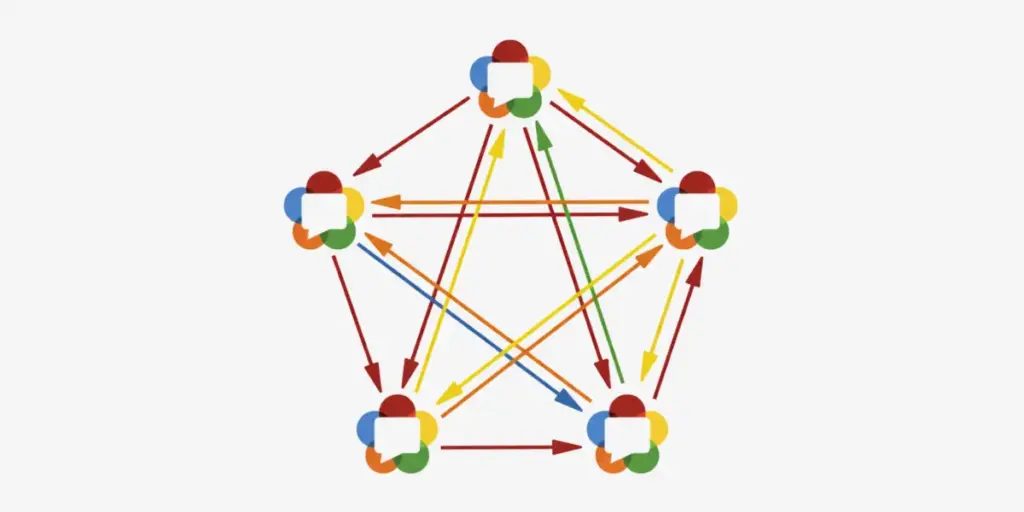
Mesh topology creates direct peer-to-peer connections between every participant. Each user sends their media stream directly to all other participants and receives streams from everyone else.
Connection Mathematics:
- 3 participants = 6 total connections
- 4 participants = 12 total connections
- 5 participants = 20 total connections
- Formula: N × (N-1) connections for N participants
Mesh Network Resource Requirements
Per-Participant Bandwidth:
- Upload: (N-1) × stream bitrate
- Download: (N-1) × stream bitrate
- Example: 4-person call at 1 Mbps = 3 Mbps up + 3 Mbps down per user
Client-Side Processing:
- Encoding: 1 stream per participant
- Decoding: (N-1) streams per participant
- Network management: (N-1) WebRTC connections
When to Choose Mesh Topology
Optimal Use Cases:
- 2-4 participant video calls
- High-security applications requiring end-to-end encryption
- Cost-sensitive deployments avoiding server infrastructure
- Low-latency requirements (50-100ms possible)
Technical Prerequisites:
- Participants with robust upload bandwidth (3+ Mbps)
- Modern devices with sufficient CPU resources
- Symmetric network conditions across all users
Mesh Topology Limitations
Scalability Barriers:
- Performance degradation beyond 4 participants
- Exponential bandwidth consumption growth
- Client CPU overload with multiple stream processing
- Network instability amplified across all connections
SFU (Selective Forwarding Unit): Centralized Stream Routing
How SFU Architecture Works
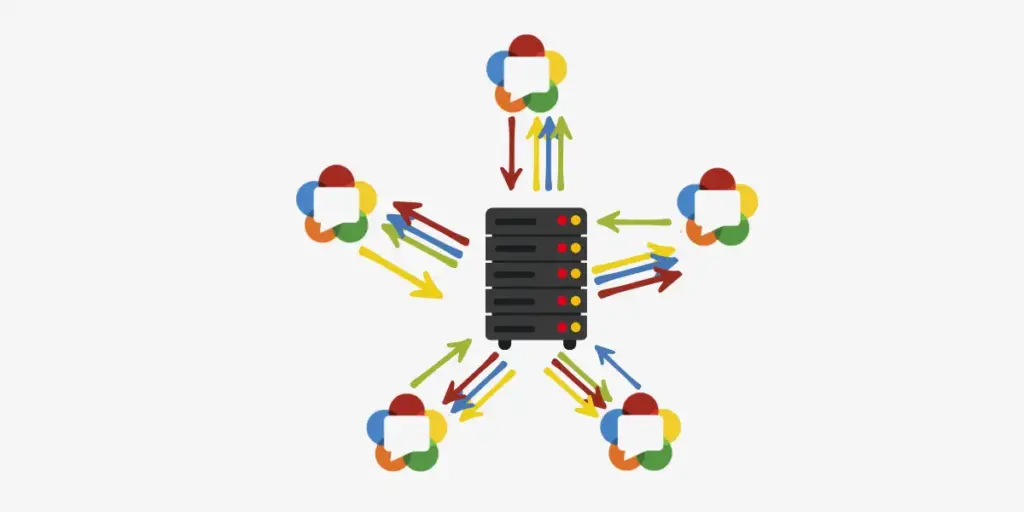
SFU servers receive media streams from each participant and forward them to other participants without processing or mixing content. Each user uploads once and downloads multiple streams.
Stream Flow Pattern:
- Upload: 1 stream per participant to SFU
- Download: (N-1) streams from SFU per participant
- Server processing: Routing without transcoding
SFU Resource Requirements
Bandwidth Distribution:
- Client upload: 1 × stream bitrate per participant
- Client download: (N-1) × stream bitrate per participant
- Server bandwidth: N × stream bitrate aggregate
Server Specifications:
- CPU: Minimal (routing-only operations)
- Memory: Stream buffering and routing tables
- Network: High-bandwidth infrastructure required
SFU Implementation with Ant Media Server
Ant Media Server provides advanced SFU capabilities with these enhancements:
Stream-Based SFU Features:
- Individual WebRTC stream management per participant
- Dynamic participant addition/removal
- Cross-platform SDK support (JavaScript, Android, iOS, Flutter)
Track-Based SFU Advantages:
- Single WebRTC connection for multiple streams
- Selective track enable/disable functionality
- Reduced client-side resource consumption
- Automatic participant notifications
When to Choose SFU Topology
Optimal Scenarios:
- 5-100+ participant conferences
- Flexible layout requirements per user
- Cost-efficient scaling needs
- Mobile-friendly applications
Technical Benefits:
- Linear server scaling with participant count
- Client upload bandwidth optimization
- Layout customization per participant
- End-to-end encryption compatibility
SFU Scaling Considerations
Performance Thresholds:
- Single server: 500-1000 concurrent participants
- Cluster deployment: 10,000+ participants possible
- Bandwidth: 1 Gbps per 500 concurrent 1080p streams
Ready to Scale? Learn about clustering and scaling strategies for enterprise deployments.
MCU (Multipoint Conferencing Unit): Centralized Media Processing
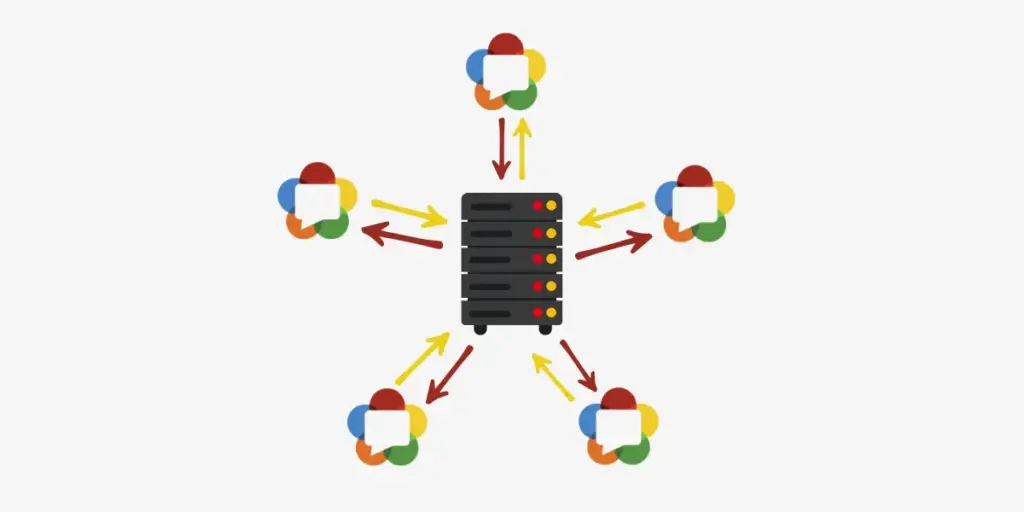
How MCU Architecture Functions
MCU servers decode all incoming media streams, mix them into composite video and audio, then encode and distribute single streams to each participant.
Processing Pipeline:
- Receive individual streams from all participants
- Decode video and audio content
- Compose unified layout with all participants
- Encode composite stream
- Distribute to each participant
MCU Resource Requirements
Server Processing Demands:
- CPU: High (encoding/decoding operations)
- Memory: Significant (multiple stream buffers)
- GPU: Optional but beneficial for encoding acceleration
Resource Calculations:
- Decoding: N input streams per session
- Encoding: N output streams per session
- Processing load: Exponential with participant count
MCU Implementation in Ant Media Server
MCU Conference Features:
- Real-time stream mixing and composition
- Single broadcast output for recording/streaming
- Adaptive layout adjustments
- Social media integration capabilities
Configuration Requirements:
- Adaptive bitrate settings mandatory
- Hardware encoding recommended (GPU acceleration)
- Cluster mode support for distributed processing
When to Choose MCU Topology
Ideal Applications:
- Legacy system integration requirements
- Single-stream recording/broadcasting needs
- Bandwidth-constrained client environments
- Standardized layout enforcement
Business Advantages:
- Predictable client bandwidth consumption
- Simplified client implementation
- Consistent user experience across devices
- External system compatibility
MCU Scaling Limitations
Resource Constraints:
- CPU-intensive operations limit concurrent sessions
- Server costs increase exponentially with participants
- Processing latency introduction (100-300ms typical)
- Complex horizontal scaling requirements
Performance Comparison Matrix
Bandwidth Requirements (Per Participant)
| Topology | 4 Participants | 10 Participants | 20 Participants |
|---|---|---|---|
| Mesh | 3 Mbps up/down | Impractical | Not viable |
| SFU | 1 Mbps up / 3 Mbps down | 1 Mbps up / 9 Mbps down | 1 Mbps up / 19 Mbps down |
| MCU | 1 Mbps up/down | 1 Mbps up/down | 1 Mbps up/down |
Server Resource Requirements
| Topology | CPU Load | Memory Usage | Bandwidth Load |
|---|---|---|---|
| Mesh | None | None | None |
| SFU | Low | Medium | High |
| MCU | Very High | High | Medium |
Latency Characteristics
| Topology | Typical Latency | Latency Factors |
|---|---|---|
| Mesh | 50-100ms | Network conditions only |
| SFU | 100-200ms | Server routing + network |
| MCU | 200-500ms | Processing + encoding delay |
Decision Framework: Selecting the Right Topology
Participant Count Thresholds
2-4 Participants: Mesh topology optimal
- Zero server costs
- Lowest possible latency
- Simple implementation
5-20 Participants: SFU recommended
- Balanced resource requirements
- Flexible user experience
- Cost-effective scaling
20+ Participants: SFU with clustering
- Distributed processing
- Geographic distribution
- Enterprise-grade reliability
Legacy Integration Needs: MCU required
- Single stream output
- Standardized layouts
- External system compatibility
Technical Decision Criteria
Network Conditions Assessment:
- Available upload bandwidth per participant
- Network stability and symmetry
- Geographic distribution of users
- Mobile vs desktop user ratio
Server Infrastructure Evaluation:
- CPU and GPU processing capabilities
- Network bandwidth capacity
- Scaling requirements and timeline
- Operational cost constraints
Application Requirements Analysis:
- Layout flexibility needs
- Recording and streaming requirements
- Security and encryption standards
- Integration with existing systems
Hybrid Approaches and Modern Considerations
Dynamic Topology Selection
Advanced implementations use participant count triggers:
- Start with mesh for ≤4 participants
- Automatically transition to SFU at 5+ participants
- Implement MCU for specific recording/streaming needs
Edge Computing Integration
Modern WebRTC deployments leverage edge infrastructure:
- SFU servers distributed globally
- Reduced latency through geographic proximity
- Automatic server selection based on location
Codec Optimization Strategies
VP9 and AV1 Support:
- Higher compression ratios reduce bandwidth requirements
- GPU acceleration essential for real-time encoding
- Client compatibility considerations
Simulcast Implementation:
- Multiple quality streams from single source
- Adaptive selection based on recipient capabilities
- Bandwidth optimization for mixed device environments
Implementation Recommendations with Ant Media Server
Getting Started with SFU
Stream-Based Conference Setup:
- Configure adaptive bitrate settings
- Implement room management via REST API
- Integrate participant management callbacks
- Deploy cross-platform SDKs
Track-Based Conference Advantages:
- Single WebRTC connection management
- Selective audio/video track control
- Optimized resource utilization
- Simplified client implementation
Documentation: Access our complete getting started guide for step-by-step implementation instructions.
MCU Implementation Best Practices
Configuration Requirements:
- Enable adaptive transcoding settings
- Configure hardware acceleration
- Set appropriate mixing layouts
- Implement recording workflows
Scaling Considerations:
- Cluster mode deployment for load distribution
- GPU-accelerated encoding for performance
- Load balancing across multiple MCU nodes
Monitoring and Optimization
Performance Metrics:
- CPU utilization per concurrent session
- Memory consumption patterns
- Network bandwidth utilization
- Participant connection quality
Quality Assurance:
- Frame rate consistency monitoring
- Audio-video synchronization validation
- Participant experience tracking
- Resource utilization alerting
Future-Proofing Your WebRTC Architecture
Emerging Technology Considerations
WebRTC-NV (Next Version) Features:
- Enhanced codec support (AV1)
- Improved simulcast capabilities
- Better mobile optimization
- Standardized SFU APIs
5G Network Impact:
- Increased upload bandwidth availability
- Reduced network latency
- Enhanced mobile streaming capabilities
- Edge computing integration opportunities
Scaling Strategy Evolution
Progressive Implementation Path:
- Start with mesh for initial user base
- Implement SFU as primary architecture
- Add MCU capabilities for specific use cases
- Deploy hybrid selection logic
- Optimize with edge distribution
FAQs
Which WebRTC topology is best for my application?
Choosing a mesh for 2-4 participants when minimizing server costs is priority. Select SFU for 5-100+ participants requiring flexible layouts and cost-effective scaling. Use MCU when you need single composite streams for recording, legacy integration, or bandwidth-constrained clients.
How much bandwidth does each topology require?
Mesh: Each participant uses (N-1) × stream bitrate for both upload and download. Example: 4 people at 1 Mbps = 3 Mbps up/down per person.
SFU: Upload stays constant at 1 × stream bitrate. Download scales with participants: (N-1) × stream bitrate. More bandwidth-efficient for upload.
MCU: Most bandwidth-efficient for clients – 1 × stream bitrate up/down regardless of participant count. Server handles processing overhead.
Can I switch between topologies after deployment?
Yes, but switching requires significant development effort. Plan for 3-6 months of engineering time for topology migrations. Design your application architecture to support multiple topologies from the start if you anticipate growth beyond initial requirements.
What are the server costs for each topology?
Mesh: Zero server costs – all processing happens on client devices.
SFU: Moderate server costs focused on bandwidth and routing. Typical costs: $50-500/month for 100 concurrent participants.
MCU: Highest server costs due to CPU-intensive processing. Expect 10-50x higher costs than SFU for equivalent participant loads.
Does topology choice affect video quality?
Yes significantly. Mesh maintains highest quality for small groups but degrades rapidly with more participants. SFU preserves individual stream quality with flexible layouts. MCU may reduce quality due to encoding/decoding cycles but provides consistent experience across all participants.
Can I use WebRTC topologies for mobile applications?
All topologies work on mobile, but considerations vary:
Mesh: Drains battery quickly and requires strong mobile data connections.
SFU: Best mobile performance with optimized upload requirements and adaptive streaming.
MCU: Most mobile-friendly for bandwidth but may increase latency on cellular networks.
How does Ant Media Server support different topologies?
Ant Media Server provides comprehensive support for all three topologies:
Stream-Based SFU: Individual stream management with cross-platform SDKs
Track-Based SFU: Optimized resource usage with selective track control
MCU: Real-time mixing with GPU acceleration and cluster support
Hybrid: Dynamic topology selection based on participant count
What happens if my server fails in SFU or MCU setups?
SFU: Participants lose connection immediately. Implement clustering and failover mechanisms for high availability.
MCU: Complete session interruption. Requires robust backup systems and session migration capabilities.
Mesh: No server dependency means inherent fault tolerance, but individual peer failures still affect other participants.
How do I handle mixed device capabilities?
SFU with Simulcast: Publish multiple quality streams, let SFU select appropriate version for each participant’s device capabilities.
MCU with Adaptive Encoding: Server adjusts composite stream quality based on weakest participant’s capabilities.
Mesh: Relies on peer negotiation, but limited optimization options for mixed environments.
What codec considerations apply to each topology?
Mesh: Codec compatibility must be negotiated between all peers directly.
SFU: Supports codec passthrough without transcoding, maintaining original quality.
MCU: Enables codec translation between incompatible clients, useful for legacy system integration.
Conclusion
WebRTC topology selection directly impacts application scalability, cost structure, and user experience quality. Mesh topology excels for small groups prioritizing minimal latency and zero server costs. SFU architecture provides the optimal balance for most applications with 5+ participants, offering flexible layouts and cost-effective scaling.
MCU topology serves specific use cases requiring single composite streams or legacy system integration, though with higher server resource requirements. Modern implementations benefit from dynamic topology selection and edge computing integration.
Ant Media Server supports all three topologies with advanced features including track-based SFU optimization, GPU-accelerated MCU processing, and cluster-mode scaling. The platform enables smooth topology evolution as your application grows from initial deployment to enterprise scale.
Choose your topology based on participant count thresholds, resource constraints, and specific application requirements. Plan for growth with hybrid approaches that adapt to changing user demands while maintaining optimal performance and cost efficiency.
Estimate Your Streaming Costs
Use our free Cost Calculator to find out how much you can save with Ant Media Server based on your usage.
Open Cost Calculator