Choosing the right video resolution affects everything from viewer experience to infrastructure costs. Professional broadcasters using platforms like Ant Media Server need to understand how resolution impacts streaming quality, bandwidth consumption, and audience reach.
This guide explains video resolution fundamentals and provides practical frameworks for selecting the optimal resolution based on your broadcast type, audience capabilities, and technical constraints.
Table of Contents
- What is Video Resolution?
- Common Video Resolutions
- Resolution vs. Quality
- SD or HD: Which is Best for Live Streaming
- Best Video Resolutions for Multiple Streaming Platforms
- Technical Requirements by Resolution
- WebRTC Resolution Considerations
- Codec Selection Impact on Resolution
- Adaptive Bitrate Resolution Strategy
- Common Resolution Mistakes
- Frequently Asked Questions
- Conclusion
What is Video Resolution?
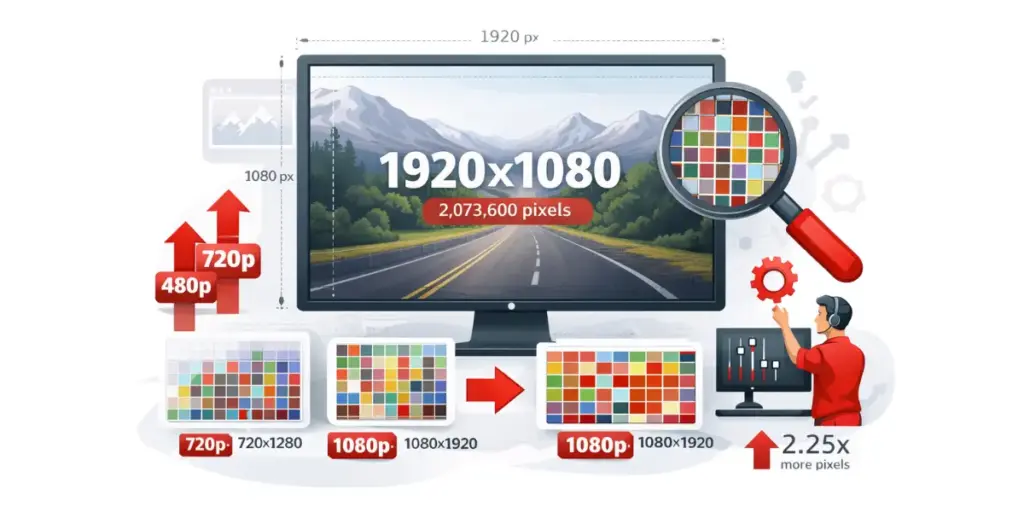
Video resolution measures the number of pixels in each frame of your broadcast. A 1920×1080 stream displays 1920 pixels horizontally and 1080 pixels vertically, totaling 2,073,600 pixels per frame.
Resolution determines the level of detail viewers see in your broadcast. Higher pixel counts provide sharper images with more visible information. A 1080p stream contains 2.25 times more pixels than 720p, resulting in noticeably clearer video on larger screens.
The W3C WebRTC specification requires browsers to handle video at minimum 320×240 pixels at 20 frames per second for universal compatibility. Modern streaming platforms typically support resolutions ranging from 480p to 4K, with 720p and 1080p being most common for live streaming.
Display size and viewing distance affect how resolution is perceived. ITU-R BT.500 viewing standards recommend sitting 1.5 times the screen height away for HD content. At this distance, 720p looks sharp on screens up to 50 inches. Mobile viewers see less difference between 720p and 1080p on small screens.
Common Video Resolutions
Professional broadcasters work with several standard resolution tiers, each suited for different use cases and audience capabilities.
Standard Definition (SD) – 480p
SD uses 854×480 pixels. SD was the broadcast standard for decades and remains useful for backup streams, mobile-first audiences on metered data plans, and internal communications over limited networks.
SD streams typically require 800-1200 kbps bandwidth. A broadcaster serving 1,000 concurrent viewers at 480p uses approximately 1 Gbps total bandwidth.
High Definition (HD) – 720p
HD resolution at 1280×720 pixels provides clear, detailed images suitable for most modern broadcasting. This resolution offers excellent quality-to-bandwidth ratio.
When to Use 720p
- General live streaming to mixed audiences
- Sports broadcasts prioritizing smooth motion at 60 fps
- Mobile-optimized content
- Budget-conscious broadcasting
720p streams require 1500-2500 kbps for good quality. At 60 fps, sports broadcasts typically use 3000-4000 kbps to maintain motion clarity.
Full HD – 1080p
Full HD at 1920×1080 pixels is the current standard for premium content. It provides sharp, detailed images across most display sizes.
When to Use 1080p
- Professional broadcasts to desktop audiences
- Premium content with subscription models
- Detailed visual content (product demonstrations, tutorials)
- Corporate presentations and high-value events
1080p streams require 3000-5000 kbps for standard content. Fast-motion content like sports benefits from 5000-8000 kbps.
4K Ultra HD – 2160p
4K at 3840×2160 pixels offers exceptional detail with four times the pixels of 1080p. This resolution demands significant infrastructure investment.
4K streams require 13000-20000 kbps minimum. According to ITU-T P.1204 research, 4K provides marginal perceptual improvement over 1080p on screens under 55 inches at normal viewing distances. Reserve 4K for premium services, professional production archives, or specialized applications.
Resolution vs. Quality: Understanding the Difference
Higher resolution does not automatically mean better quality. Video quality depends on multiple factors working together.
The Bitrate Factor
Bitrate controls how much data represents each second of video. A 1080p stream at 1500 kbps looks significantly worse than a 720p stream at 2500 kbps. The lower-resolution stream has more bits per pixel, preserving detail and reducing compression artifacts.
Testing by the National Telecommunications and Information Administration shows that adequate bitrate matters more than resolution for perceived quality. Calculate bits per pixel to evaluate quality: divide bitrate by (width × height × frame rate). Target 0.10-0.15 bits per pixel for good quality.
Frame Rate Impact
Resolution and frame rate compete for bitrate. At 4000 kbps, you can stream either 1080p30 or 720p60. For motion-heavy content, 720p60 often provides better perceived quality than 1080p30. Static content favors higher resolution over frame rate.
WebRTC implementations adjust resolution and frame rate dynamically based on available bandwidth. A stream may start at 1080p30, drop to 720p30 during congestion, and recover when bandwidth improves.
Network Resilience and Packet Loss Recovery
For WebRTC streaming, resolution choice affects how well streams maintain quality during network instability. NACK (Negative Acknowledgment) and PLI (Picture Loss Indication) retransmission mechanisms recover lost packets, but efficiency varies by resolution.
Packet Loss Recovery by Resolution
- 1080p: 2.25x more packets per frame than 720p, requiring more retransmission time
- 720p: Balanced packet count enables fast recovery from 5-10% packet loss
- 480p: Minimal retransmission overhead, most resilient to network issues
During network congestion, lower resolutions maintain quality better because retransmission completes faster. A 720p stream experiencing 5% packet loss requires 7-10% additional bandwidth for retransmissions. The same packet loss in 1080p requires 10-15% overhead.
SD or HD: Which is Best for Live Streaming
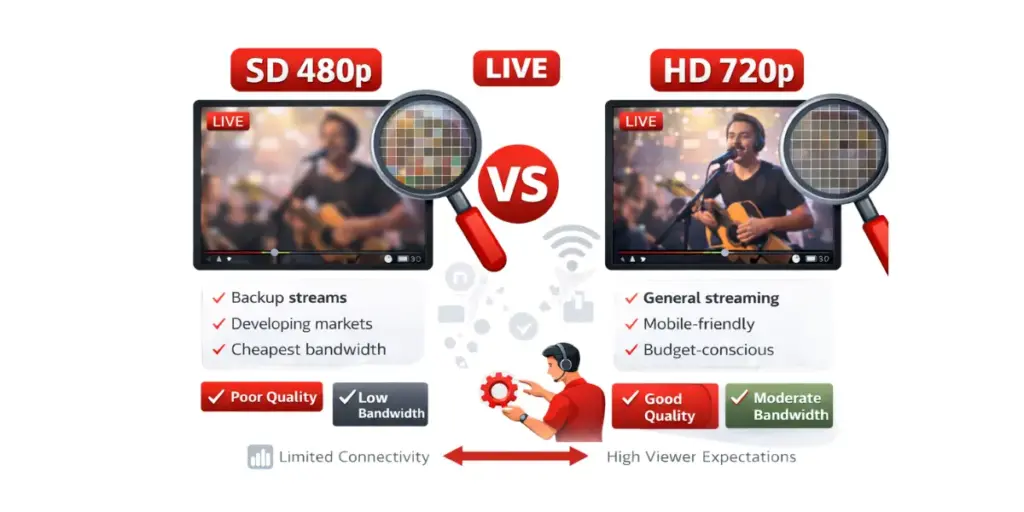
The choice between SD and HD depends on your audience capabilities, content requirements, and business constraints.
HD as the Modern Standard
HD has become the expected minimum for professional broadcasting. Viewer surveys show that 78% of audiences consider HD essential for engaging content. Streaming at SD in 2024-2025 signals low production value unless specific circumstances require it.
Most modern devices handle HD playback efficiently. Mobile processors include hardware decoders for HD H.264 video. Network speeds have improved globally, with median mobile speeds exceeding 10 Mbps in developed markets—sufficient for 720p streaming.
When SD Makes Sense
SD remains appropriate for emergency backup streams during bandwidth spikes, developing market audiences with limited connectivity, internal communications over constrained networks, and long-duration archives where storage costs matter.
An adaptive bitrate ladder should include 480p as the lowest tier for maximum reach. This ensures viewers with poor connections can watch rather than facing constant buffering.
HD Tier Selection
Choose 720p when bandwidth budget is limited, serving primarily mobile audiences, or streaming high frame rate content (60 fps). Choose 1080p for desktop audiences, detailed visual content, and when competing with established broadcasters who stream at 1080p.
Many successful broadcasters use 720p as their standard tier while offering 1080p for premium subscribers or optimal viewing conditions.
Best Video Resolutions for Multiple Streaming Platforms
Different platforms and use cases have optimal resolution targets based on audience behavior and technical requirements.
YouTube Live Streaming
YouTube supports resolutions from 240p to 4K. The platform’s recommendations prioritize 1080p for desktop viewing and 720p for mobile optimization.
YouTube Optimal Settings
- Standard broadcasts: 1080p30 at 4500-5000 kbps
- High-motion content: 1080p60 at 6000-8000 kbps
- Mobile-optimized: 720p30 at 2500-3000 kbps
Facebook Live
Facebook Live works best at 720p for most broadcasts. The platform compresses video aggressively, reducing quality gains from 1080p sources.
Facebook Optimal Settings
- Standard broadcasts: 720p30 at 3000-4000 kbps
- High-quality events: 1080p30 at 4000-5000 kbps
Twitch
Twitch audiences expect high quality, particularly for gaming content. The platform supports up to 1080p60.
Twitch Optimal Settings
- Gaming streams: 1080p60 at 6000 kbps (Partner/Affiliate)
- Non-gaming: 1080p30 at 4500-5000 kbps
- Starting streamers: 720p60 at 4500 kbps (better compatibility)
Custom WebRTC Streaming
WebRTC streaming through platforms like Ant Media Server’s adaptive bitrate streaming offers full resolution control based on your specific requirements.
WebRTC Resolution Strategy
- Interactive applications: 720p30 for 0.5 to 1 second latency
- Professional broadcasts: 1080p30 with simulcast support
- Mobile-heavy audiences: 480p–720p adaptive range
- Desktop-focused: 720p–1080p adaptive range
WebRTC’s simulcast capability enables simultaneous encoding at multiple resolutions. A broadcaster can produce 1080p, 720p, and 480p variants, letting viewers receive the optimal version for their device and network.
Technical Requirements by Resolution
Each resolution tier demands specific infrastructure capabilities to deliver reliably to your audience.
Encoding Server Requirements
Resolution directly affects CPU usage during encoding. Transcoding 1080p streams requires substantially more processing power than 720p.
Per-Stream CPU Requirements
- 480p: 0.5-1.0 CPU cores
- 720p: 1.0-2.0 CPU cores
- 1080p: 2.0-3.0 CPU cores
- 4K: 6.0-8.0 CPU cores
Memory Requirements by Resolution
- 480p: 500 MB RAM per stream
- 720p: 1 GB RAM per stream
- 1080p: 2 GB RAM per stream
- 4K: 4-6 GB RAM per stream
For large-scale broadcasts to thousands of concurrent viewers, implementing clustering and load balancing setup ensures your infrastructure can handle the processing demands.
Network Bandwidth Requirements
Bandwidth requirements multiply by concurrent viewer count. A 1080p stream at 4000 kbps serving 1,000 viewers requires 4 Gbps sustained output bandwidth.
CDN Bandwidth by Resolution
| Resolution | Bitrate | 1,000 Viewers | 10,000 Viewers |
|---|---|---|---|
| 480p | 1000 kbps | 1 Gbps | 10 Gbps |
| 720p | 2500 kbps | 2.5 Gbps | 25 Gbps |
| 1080p | 4000 kbps | 4 Gbps | 40 Gbps |
| 4K | 15000 kbps | 15 Gbps | 150 Gbps |
For WebRTC streaming, add bandwidth overhead for NACK and PLI packet retransmissions. Under typical network conditions with 3-5% packet loss:
WebRTC Bandwidth with Retransmission Overhead
| Resolution | Base Bitrate | Retransmission Overhead | Total Required |
|---|---|---|---|
| 480p | 1000 kbps | 4-6% (40-60 kbps) | 1040-1060 kbps |
| 720p | 2500 kbps | 7-10% (175-250 kbps) | 2675-2750 kbps |
| 1080p | 4000 kbps | 10-15% (400-600 kbps) | 4400-4600 kbps |
Budget 10-15% additional bandwidth for WebRTC deployments to account for retransmission overhead and maintain quality.
Storage Requirements
Recording resolution affects storage costs significantly.
Storage per Hour by Resolution
- 480p @ 1000 kbps: 450 MB/hour
- 720p @ 2500 kbps: 1.1 GB/hour
- 1080p @ 4000 kbps: 1.8 GB/hour
- 4K @ 15000 kbps: 6.75 GB/hour
A broadcaster recording 4 hours daily at 1080p generates 216 GB weekly or 11 TB annually.
WebRTC Resolution Considerations
WebRTC streaming introduces unique factors affecting resolution selection compared to traditional RTMP streaming.
Dynamic Resolution Adjustment
WebRTC implementations adapt resolution automatically based on network conditions. When bandwidth drops, the encoder reduces resolution to maintain stream stability. This dynamic adjustment prevents viewer disconnection during network fluctuations.
Simulcast for Mixed Audiences
WebRTC simulcast encodes multiple resolution variants simultaneously from a single source. A broadcaster encodes 1080p, 720p, and 480p streams concurrently.
Ant Media Server automatically routes appropriate resolution to each viewer based on their device capability and network conditions. Simulcast increases server load proportionally to the number of variants. Encoding three resolutions requires approximately 2.5x the CPU of single-resolution encoding.
Packet Loss Recovery and Retransmission
WebRTC implements NACK (Negative Acknowledgment) and PLI (Picture Loss Indication) for packet retransmission. When packets are lost during transmission, the receiver requests retransmission through NACK. For complete frame loss, PLI requests a new keyframe from the encoder.
Impact on Different Resolutions
- 1080p generates 2.25x more packets than 720p per frame
- Higher resolutions require more retransmissions during packet loss
- 720p streams recover faster from network congestion
- 480p requires minimal retransmission bandwidth
Lower resolutions benefit more from NACK/PLI retransmission. With fewer packets to retransmit, 720p and 480p streams maintain quality better than 1080p during network instability. This makes 720p the optimal choice for WebRTC broadcasting where network conditions vary.
All modern browsers support NACK and PLI per RFC 7742 specifications. Ant Media Server automatically handles retransmission requests, maintaining stream quality during temporary packet loss without broadcaster intervention.
Ultra-Low Latency Tradeoffs
WebRTC streaming delivers 0.5 to 1 second latency, making it suitable for interactive applications. Higher resolutions increase encoding time, adding latency to this baseline.
Encoding Latency by Resolution
- 480p: 15-25 ms encoding delay
- 720p: 25-40 ms encoding delay
- 1080p: 35-55 ms encoding delay
- 4K: 80-120 ms encoding delay
For interactive applications requiring 0.5 to 1 second glass-to-glass latency, 720p provides the best balance. Remote production, live auctions, and real-time collaboration applications benefit from 720p at 30 fps rather than 1080p.
Codec Selection Impact on Resolution
Video codec choice significantly affects how efficiently different resolutions can be delivered to viewers.
H.264 Characteristics
H.264 remains the most universally supported codec for web streaming. Browser support is ubiquitous, and hardware decoders exist in virtually all modern devices.
H.264’s Constrained Baseline profile works universally across WebRTC browsers per W3C specifications. For broadcasts targeting maximum compatibility, H.264 at 720p or 1080p provides reliable delivery across all viewer devices and networks.
H.265 for Higher Resolutions
H.265 reduces bitrate requirements 30-50% compared to H.264 at equivalent quality according to ITU-T specifications. A 1080p H.265 stream at 2500 kbps matches H.264 quality at 4000 kbps.
However, H.265 browser support is limited. Safari offers native support on macOS and iOS, but Chrome and Firefox lack native WebRTC support. Broadcasting H.265 for WebRTC requires transcoding to H.264 for Chrome and Firefox viewers.
VP9 and AV1
VP9 provides 20-40% better compression than VP8 with royalty-free licensing. AV1 delivers approximately 30% better compression than H.265 but with higher encoding complexity.
Real-time AV1 encoding of 1080p requires substantial CPU resources or dedicated hardware accelerators. Hardware acceleration for AV1 is emerging in newer processors, and the codec will eventually enable more efficient 1080p and 4K delivery.
Adaptive Bitrate Resolution Strategy
Multi-resolution streaming accommodates diverse viewer capabilities and network conditions.
How ABR Works
Adaptive bitrate streaming encodes content at multiple quality levels. The player measures available bandwidth and requests appropriate quality segments. Initial segments download at low resolution for fast playback start. As buffer builds and bandwidth proves sufficient, the player upgrades to higher resolutions.
Configuring ABR in Ant Media Server
Ant Media Server simplifies adaptive bitrate configuration through its dashboard interface. Navigate to Application Settings, enable “Adaptive Bitrate” option, configure resolution tiers and target bitrates, and set keyframe interval to 2 seconds.
Recommended ABR Configuration
- Resolution: 1920×1080, Bitrate: 4000 kbps
- Resolution: 1280×720, Bitrate: 2500 kbps
- Resolution: 854×480, Bitrate: 1200 kbps
- Resolution: 640×360, Bitrate: 800 kbps
The platform automatically generates lower resolution variants during encoding. Viewers receive the optimal stream for their current network conditions without manual intervention.
Common Resolution Mistakes
Avoid these frequent errors that degrade viewer experience or waste resources.
Broadcasting at Capture Resolution
Cameras often capture at higher resolutions than distribution requires. A 4K camera feeding a 720p stream wastes encoding resources processing unnecessary pixels. Configure cameras for target resolution plus 10-20% for cropping flexibility.
Over-Provisioning Quality
Streaming 1080p to viewers on 720p displays wastes bandwidth without quality improvement. Analytics reveal that 60% of viewers watch on devices with 1080p or lower native resolution. Adaptive bitrate handles this automatically when configured properly.
Neglecting Frame Rate
Resolution and frame rate interact significantly. 1080p30 uses similar bandwidth to 720p60. For motion content, 720p60 often provides better perceived quality than 1080p30. For static content like presentations, prioritize resolution over frame rate.
Ignoring Aspect Ratio
Mismatched aspect ratios create black bars or stretched images. 16:9 is standard for most broadcasts. Mobile-first content might use 9:16 vertical format. Choose one format and optimize resolution within that aspect ratio.
Frequently Asked Questions
What resolution is best for live streaming?
720p provides the best balance of quality, compatibility, and efficiency for most live streaming. It delivers clear, detailed images on screens up to 50 inches while requiring only 2000-3000 kbps bandwidth. Upgrade to 1080p when serving primarily desktop audiences with reliable high-bandwidth connections.
How do I choose between 720p and 1080p?
Choose 720p when bandwidth is limited, audiences are primarily mobile, or you’re streaming high frame rate content. 720p at 60 fps often looks better than 1080p at 30 fps for motion-heavy content. Choose 1080p for desktop audiences, detailed visual content, and when competing with established broadcasters who stream at 1080p.
Does higher resolution always mean better quality?
No. Quality depends on bitrate, codec efficiency, and content characteristics as much as resolution. A well-encoded 720p stream at 2500 kbps looks better than a poorly-encoded 1080p stream at 2000 kbps. Calculate bitrate ÷ (width × height × framerate) and target 0.10-0.15 bits per pixel for good quality.
How much bandwidth does each resolution require?
Bandwidth requirements vary by codec and content complexity. 480p requires 800-1200 kbps, 720p30 requires 1500-2500 kbps, 1080p30 requires 3000-5000 kbps, and 4K30 requires 13000-20000 kbps. For WebRTC, add 10-15% for packet retransmission overhead.
What is adaptive bitrate streaming?
Adaptive bitrate streaming encodes content at multiple quality levels simultaneously. Players measure available bandwidth and request appropriate quality segments. When bandwidth drops, the player switches to lower resolution to prevent buffering. ABR ensures viewers with poor connections can watch at lower quality rather than facing constant interruptions.
How does WebRTC handle packet loss at different resolutions?
WebRTC implements NACK (Negative Acknowledgment) and PLI (Picture Loss Indication) mechanisms to recover from packet loss. Resolution significantly affects packet loss recovery efficiency. 1080p generates 2.25x more packets than 720p, requiring more time to retransmit. 720p recovers from 5% packet loss with 7-10% additional bandwidth overhead, while 480p requires only 4-6% overhead. Lower resolutions maintain quality better during network instability.
What resolution works best for ultra-low latency?
720p provides the best balance for WebRTC streaming with 0.5 to 1 second latency. Lower resolutions reduce encoding time, preserving latency budget for network transmission and buffering. For applications requiring 0.5 to 1 second glass-to-glass latency like remote production, live auctions, or real-time collaboration, prioritize 720p over higher resolutions.
Conclusion
Selecting video resolution for broadcasting requires balancing quality expectations, audience capabilities, and infrastructure constraints. For most professional broadcasts, 720p provides excellent quality with reasonable resource requirements. Upgrade to 1080p when serving primarily desktop audiences with reliable connections.
Implement adaptive bitrate streaming to accommodate diverse viewer capabilities. Configure resolution ladders from 480p to 1080p, letting Ant Media Server deliver optimal quality to each viewer automatically based on their device and network conditions.
Test systematically across target devices and network conditions. Monitor actual viewer behavior and quality metrics to validate resolution choices. Resolution selection is not a one-time decision. As infrastructure improves and viewer capabilities evolve, revisit resolution strategy quarterly.
Start with 720p as your baseline, implement comprehensive ABR support, and upgrade to 1080p progressively as data confirms audience benefit. This approach maximizes quality while controlling infrastructure costs.
Ready to implement these resolution strategies in your broadcasts? Try Ant Media Server free for 14 days and test multi-resolution streaming with your content. Compare Community and Enterprise Edition features to find the right solution for your broadcasting needs.
Estimate Your Streaming Costs
Use our free Cost Calculator to find out how much you can save with Ant Media Server based on your usage.
Open Cost Calculator